.png)


What are Auto Applied Recommendations?
What are AARs?
AARs - or Automatically Applied Recommendations - were essentially Google’s first shot at AI account management. Shunned by agencies and Google Ads experts, these started to be pushed heavily by Google at the start of 2020.
You can find them in the recommendations section of your Google Ads account under the section “auto apply settings.”
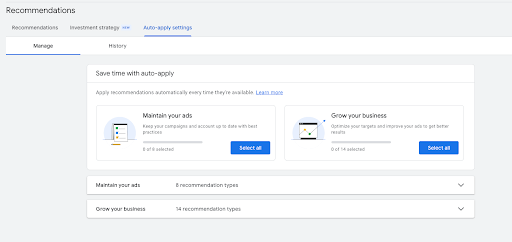
From here, AARs are segmented into two different categories: “maintain your ads” and “grow your business.”
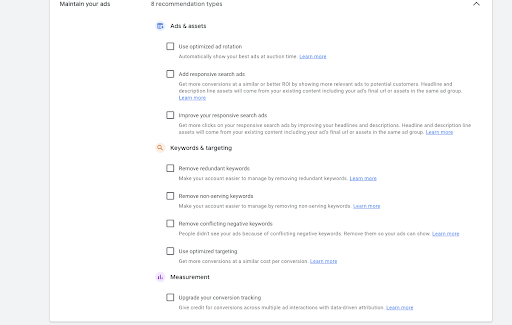
Here is a screenshot from the “Maintain Your Ads” section:
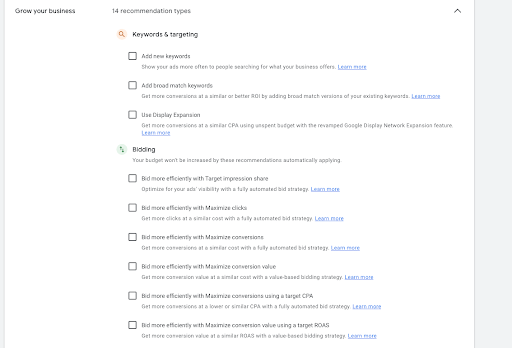
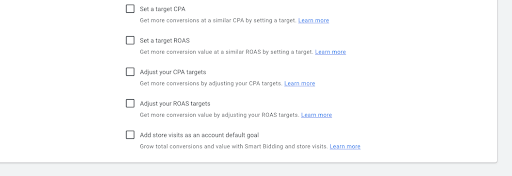
Here is the “Grow Your Business” section:
Why is Google so hyper fixated on them?
In late 2019, it became apparent that Google was training its representatives and contractors to push AARs and their adoption - meaning that the success metrics of Google reps included how many accounts they could get to adopt AARs. If you were working with Google during that time and the years following I’m sure you’ve heard all of the reasons why it could be beneficial to select some of these categories in your accounts for “optimal performance.”
Truthfully, most of these recommendations do the same thing - they bring the control of the account out of the advertisers hands and into Google’s. By doing this, Google can make certain adjustments that may enable the account to spend more money.
Lately, Google has been less focused on these and they have realized that the people that they speak to want tactics that can bring about real results. However, a few of these we often see clients opted into and some of these AARs can be quite problematic to an account.
The Most Detrimental AARs:
Add/Improve Responsive Search Ads:
At first glance these may seem innocent, however, Google seems to pull ad headlines and descriptions from the oddest places and sometimes what they are able to put together either makes little sense or doesn’t hold true to the brand they are representing. I would be very careful with these AARs due to this fact - especially if you have strict brand guidelines.
Remove Redundant Keywords:
Disguised as a helpful way to make your account simpler. Essentially, what we’ve found this AAR to do is remove exact match variants of keywords that you already have a broad match term of. This happens regardless of which keyword is actually performing better. The worst part about this recommendation is that - because the keywords are actually removed and not paused - it would be difficult to determine that Google’s use of this AAR was contributing to your performance unless you were viewing all paused/enabled and removed keywords in your campaign or ad group.
Add New Keywords:
If you’ve reviewed the “add new keywords” recommendation within the recommendations section of your account and thought that every single keyword was applicable, then this could possibly be a good option for your account. However, I have never seen that happen. The slew of keywords Google recommends always contains a hefty portion of waste that you don’t want to bid on. This AAR adds all of those automatically causing you to constantly monitor what you are spending your campaign’s money on.
Add Broad Match Keywords:
This AAR automatically adds broad match keyword variations of your existing keywords to your campaign. If you view this in the recommendations section, it will give you a list of keywords you can download that Google will add as broad match to run alongside of your existing keyword list. If you are looking to expand traffic, then doing it this way and adding a few broad match keywords is a better option than opting into Google’s automatic addition of all of these broad match keywords.
Changing Bid Strategy or Targets:
Though theoretically Google will only recommend this if they perceive a benefit to quantity of conversions or conversion value, we recommend you always review campaign performance prior to changing a bid strategy or updating a tROAS or tCPA target.
Can I Use AARs to manage my account?
Knowing this, are any AARs safe to use? Two come to mind. These two are: “use optimized ad rotation” and “upgrade your conversion tracking.” Granted, you can still select not to optimize ad rotation within Shopping, Search and Display campaigns - you would only want to do this if you were involved in some extensive ad testing. This would also hinder Smart Bidding performance if not opted into. This setting is found within your campaign settings, under “ad rotation.” Most advertisers opt into optimizing ad rotation and it is the default setting for all new campaigns.

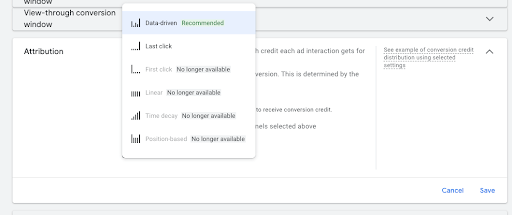
The other relatively innocuous AAR “upgrade your conversion tracking” is a relatively moot point as Google has already upgraded all in-platform conversions to DDA and deprecated all other attribution modeling - with the exception of “last click.”
As a marketing agency, we find it necessary to go into every account and check which AARs are opted into prior to management. Not only can these waste money, but we’ve seen them undo strict keyword targeting and bidding options that were working successfully prior to the AARs implementation.
As an advertiser, we recommend you review your auto applied recommendations today and ensure that Google’s automatic settings aren’t undoing your hard work and wasting your money.
.jpg)