.png)



Should I Use AI Max for My SMB Google Ads Account?
There’s no doubt that AI Max is hotly debated in the PPC community. While most agree that it does open up new keyword opportunities (though sometimes not necessarily relevant), most lament the lack of control that comes with it and it’s clear that additional testing is needed. At Makroz, we’ve observed varied performance, with some accounts benefiting greatly and others seeing little results. Ideally, AI Max should be considered for an account where you want to expand reach but you also are able to have human eyes on search terms and ad assets to determine what exactly is happening in the account and if it is gaining incrementality or - ultimately - just wasting money.
How Does AI Max Work?
AI Max is a toggle button found at the campaign level that pairs with two additional features “url expansion” and “text customization.” It’s important to note that all three of these features behave in different ways and you do not have to select the latter two when enabling AI Max in your account. You can just toggle on AI Max and remove the check mark boxes next to “final url expansion” and “text customization.” However, enabling AI Max is a prerequisite for using the ‘final URL expansion’ and ‘text customization’ features.
Clicking the AI Max button grants Google permission to expand beyond your current keyword list (even exact match), analyzing user search intent, landing page content, and ad assets to identify and bid on queries potentially missed in your initial campaign setup.
Enabling final URL expansion allows Google to extend beyond individual ad group final URLs, scanning your entire site to find pages most relevant to user search queries. The aim is to reduce friction by directing users to the most closely matched page for their search query.
Lastly, text customization within the campaign level dynamically creates your ad copy by pulling relevant text from existing ads, landing pages and other assets to create a new ad ultimately more relevant to the user’s search query.
What Does AI Max Do?
Once you enable AI Max within your campaign, you will start to see your search terms report indicating whether or not your ad was shown for a keyword due to a specific match type or AI Max.
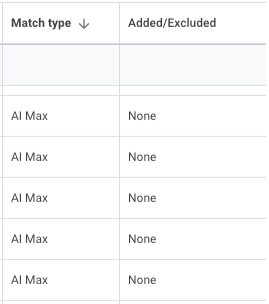
If the search terms seem irrelevant, you can still exclude them as negative keywords.
Your landing page report will include information regarding your final url expansion, with either “advertiser selected” or “automatically selected” included:
.png)
You can also remedy any poorly performing landing pages showing up for final url expansion by adding them as negative urls at the campaign level in campaign settings under “add url exclusions.”
.png)
To review automatically created assets through opting into text customization, you can either select “view asset details” on the ad level, where you can determine if any of the assets that say “automatically created,” are relevant to your business and pause them. You can also view these same assets at the campaign level by going to the “assets” section in the left side menu when your campaign is selected. Make sure “ad” is selected in the level once you do this, as it sometimes defaults to exclude that option:
.png)
If you see any assets that do not accurately represent your brand when you are reviewing them at the campaign level, you will have to go to the ad level to edit them.
What Are the Risks of Using AI Max?
As with any campaign or account level setting where you allow Google to make decisions in the account on your behalf, the inherent risks involved have to do with what Google does with the data it finds. That is why monitoring things such as search terms, landing pages and ad copy will be crucial if you run a test on AI max. That doesn’t mean that you shouldn’t test AI Max - that just means you should do it carefully with certain guardrails in place.
Make sure that your budget is something that you can actually afford to spend in the campaign you are testing AI Max on. You may also want to test it without final url expansion or ad text optimization in place to allow for less opportunities for brand misrepresentation. Once you set AI Max in place, monitor search terms carefully. Depending on your budget and bid strategy, you may want to review search terms every day to ensure you are excluding irrelevant terms. If you are testing AI Max, we’ve found it performs the best when you are optimizing towards your actual key website goals (purchases or leads) as opposed to micro conversions.
Would AI Max Benefit My SMB?
I don’t say all of this to scare you, but rather to have you use caution. Google Ads can be unpredictable at times and each account performs differently depending on auction dynamics. AI Max has a few good use cases that still make it a worthwhile test, though!
Use case #1: You do not have a lot of relevant non-brand keywords or you have too many “low search volume” keywords.
Use case #2: You are maxing out the impression share of existing keywords.
Use case #3: You want to expand the NB searches you are eligible for.
In all three of these use cases, if you are struggling with non-brand ad spend you could consider adding some relevant, longtail broad match keywords and monitoring search terms to add as additional keywords. If that still doesn’t warrant enough additional traffic, toggling on AI Max may be able to assist.
Ultimately, AI Max presents a powerful opportunity for SMBs to expand their reach and optimize their Google Ads performance. However, success hinges on a strategic and vigilant approach. By carefully monitoring search terms, landing pages, and ad assets, and by aligning AI Max with your core website goals, you can harness its potential while mitigating risks. Consider a phased implementation, perhaps starting without URL expansion or text customization, to gain confidence and refine your strategy. With thoughtful execution, AI Max can be a valuable tool in your SMB's digital marketing arsenal.
.jpg)